
Zeevou Connection User Guide
How to Connect Zeevou and Lake.com
Managing vacation rentals shouldn’t feel like you’re juggling paddles in a choppy wake. That’s why connecting Lake.com with Zeevou helps steady the ship—availability stays in sync, listing details carry over cleanly, and your team can focus on hosting instead of hopping between tabs. In a few quick steps, you’ll be ready to welcome more travelers searching for lakefront getaways.
Why connect Lake.com with Zeevou?
Centralized Control
Run your operation from one command center. Zeevou keeps key property details and calendar availability organized, while Lake.com helps you reach travelers planning trips near the water—so your listings stay accurate and bookable.
Reach High-Intent Travelers
Showcase your properties on Lake.com, the go-to platform for lakefront and waterfront vacations. From lakehouses and cottages to cabins and beach villas, your listings will be front and center for travelers dreaming of time by the water.
Premium Placement in Outdoor Destinations
Lake.com connects you to travelers exploring over 1,400 lake destinations and 4,000 nearby parks—making it easy for guests to find your property when planning their next adventure outdoors.
Step 1: Log in to Lake.com and confirm you’re in Host view
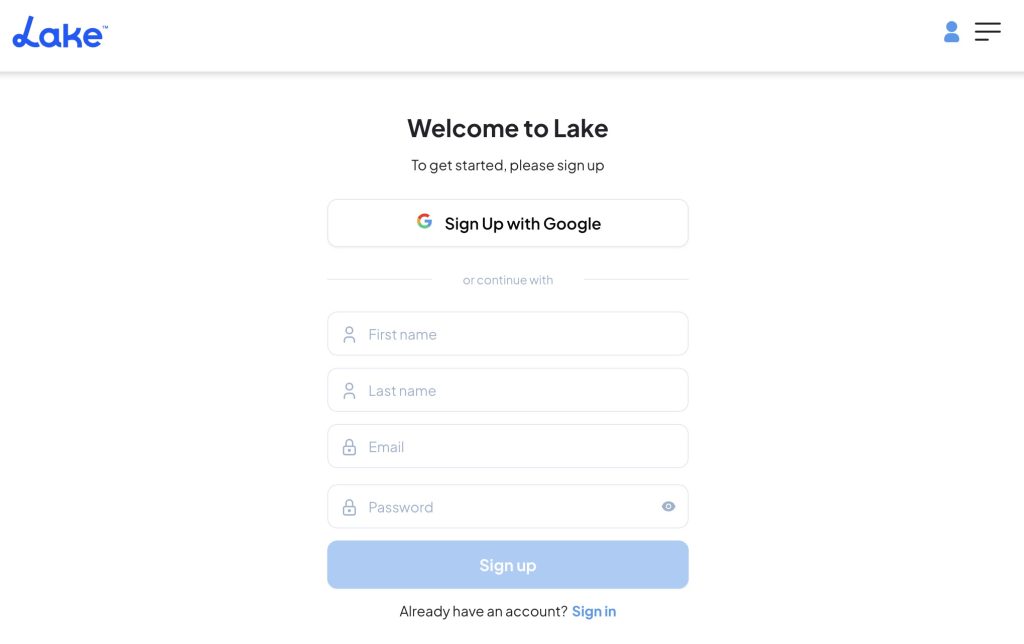
- Log in to your Lake.com account.
- Hover over the “Me” menu (top right) and confirm “Host” is toggled on.
- If you’re in Guest view, switch to Host view before continuing.

Step 2: Open Connections
- In the “Me” menu, click Connections.
- You’ll land on the Integrations page, where Lake.com’s partner connections are listed.

Step 3: Find Zeevou and click Connect
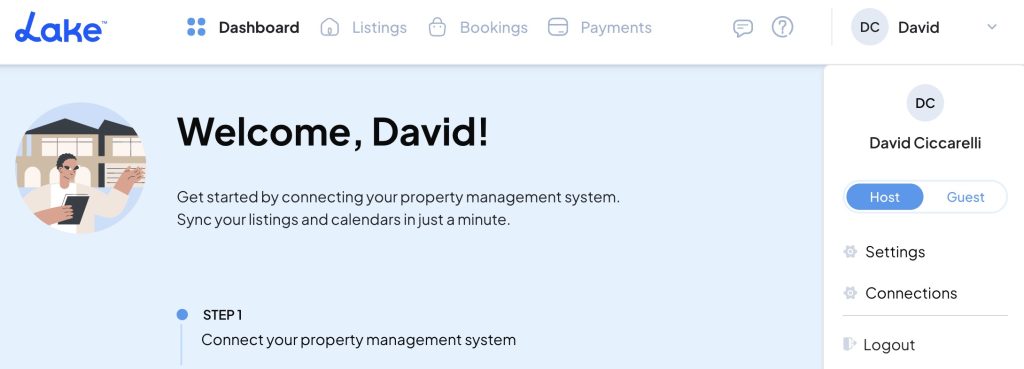
- If you’re returning later, you can always find Integrations again from the “Me” menu in the top right-hand corner.
- Scroll to find Zeevou, then click Connect.
- Next, you’ll be prompted to enter your Zeevou API key (and username, if requested).
- In Zeevou, go to Zeevou Set → Pricing Module Integration and copy your API key (and username, if shown).
- Return to Lake.com, paste the details into the connection form, then click Connect.
- If you manage multiple accounts, double-check you’re using the credentials for the correct Zeevou portfolio.
Step 4: Approve Information Sharing
- Review the data that will be synchronized between Lake.com and Zeevou.
- Click Approve. If everything checks out, you’ll see a confirmation message like Connection Successful.
- Once approved, Zeevou listings will begin syncing to Lake.com automatically.
Step 5: Confirm your listings and calendars are syncing
- The first sync may take up to an hour, depending on how many properties and photos you’re importing. Grab a coffee!
- In Lake.com, confirm your listing details and availability/calendar look accurate.
- In Zeevou, confirm the same details match in your master calendar.
Step 6: Manage Listings
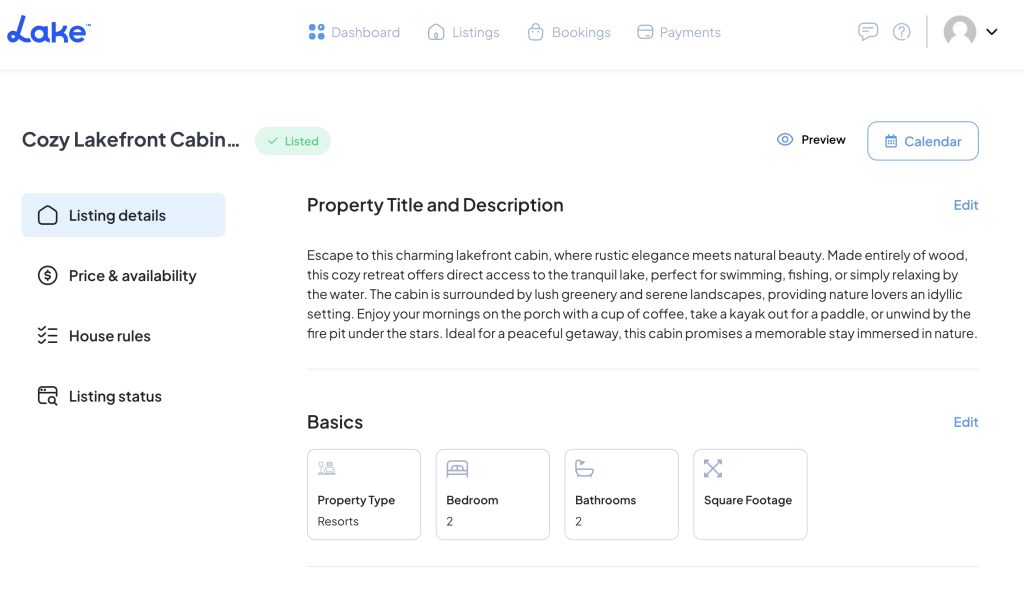
- Make ongoing listing updates in Zeevou. Changes will sync to Lake.com automatically.
- After the first sync, information will be updated on Lake.com on an automatic schedule:
- Static content, including property titles, descriptions, amenities, and photos, will be updated every 6 hours.
- Dynamic content, such as calendar availability and pricing, will update every 5 minutes. This means that if you use a dynamic pricing tool (like Beyond, PriceLabs, or Wheelhouse), those updates can flow through to Lake.com, too.
- You can view how your property appears to guests on Lake.com.
- To temporarily hide a listing while maintaining the connection, toggle the status to Unlisted.
Step 7: Promote Your Listings
Share Your Lake.com Listing on Social Media
Once your listing is live, copy your Lake.com property link and share it on Facebook, Instagram, X (Twitter), and LinkedIn. Pair the link with your best photos, a timely seasonal offer, or one standout feature (like a private dock or hot tub) to catch attention. Consistent social sharing helps drive direct traffic and builds recognition over time.
Highlight Seasonal Specials or Updates
Keep your listing looking current by refreshing photos and calling out what’s in season—paddleboarding days in summer, crisp fall color weekends, or cozy fireside nights in winter. Updates you make in Zeevou will sync to Lake.com automatically, so travelers always see the latest details when they’re comparing options.
Feature Your Lake.com Listing on Your Website or Email
If you have a website or send a newsletter, add a direct link to your Lake.com listing. Place it where it’s easy to find—on your homepage, in a “Book Now” section, or as a simple text link in your next email. This reinforces trust with your audience and can help turn warm leads into direct bookings.
What Data Gets Synchronized Between Lake.com and Zeevou
The data that will get synchronized between Lake and Zeevou includes:
- First name, last name, profile picture, email address, and phone number
- Listing information such as name, address, and description (access and modify)
- Listing calendar (access and modify)
- Reservations (access and modify)
- Guest’s first name and profile picture (access)
- Messages (access and respond)
Benefits of Integrating Zeevou with Lake.com
Connecting Zeevou with Lake.com gives vacation rental managers a powerful “home base” for day-to-day operations—paired with additional exposure to travelers searching specifically for lakefront and waterfront stays. Zeevou positions itself as a central hub to increase direct bookings, boost profits, and streamline operations.
Centralized Management
By integrating Lake.com with Zeevou, you can manage your portfolio from a single central login, keeping property and booking management organized even across multiple locations. Zeevou’s two-way API channel manager pushes rates and availability in real time to 200+ channels, helping prevent overbookings across connected platforms (including your direct booking site).
Automation and Efficiency
Zeevou’s feature set is designed around property management automation, aiming to reduce manual work in real hosting workflows. For operations, Zeevou supports task and maintenance workflows—housekeepers can view tasks, update statuses, and report issues (with photos/videos) through the mobile app, while the system tracks clock-in/out and locations. On the guest side, Zeevou’s Online Check-In automates arrivals with contactless check-in, secure ID verification, pre-arrival detail collection, and automated notifications.
Enhanced Reporting and Analytics
Zeevou highlights reporting as a core lever for smarter decisions—its Reporting & Analytics focuses on profitability, occupancy, and staff efficiency, with automated financial reporting. For performance tracking, Zeevou’s Performance Report dashboard includes KPIs like Revenue, Profit, ADR, Occupancy, and RevPAR, with filters and export options for sharing.
Scalability
Zeevou is built to support multi-unit and multi-location operators, including hierarchical property organization and unit grouping—useful when you’re managing buildings, complexes, or multiple markets. It also pairs that structure with channel and calendar tooling (including multi-unit calendars) so expanding your portfolio doesn’t require reinventing your workflow every time you add inventory.
Seamless Guest Experience
The best guest experience is the one that feels effortless. Zeevou’s Online Check-In is designed to reduce arrival friction by allowing guests to complete it before they arrive, plus automated reminders and instructions. On the communication side, Zeevou also emphasizes a unified inbox (including via mobile) to keep messages centralized, helping you respond faster and more consistently.
Troubleshooting a Zeevou Connection
To troubleshoot access issues between Lake.com and Zeevou, you can follow these steps:
1. Check Connection Status
- Verify Integration: Confirm Zeevou is connected in Lake.com Integrations and that the connection shows as active. If it’s missing or inactive, reconnect and re-approve permissions.
- Authentication: Double-check that your Zeevou API key (and username, if requested) was entered correctly. A single extra space can cause a connection to fail.
2. Review API and Permissions
- API Permissions: Ensure you approved the requested access so Lake.com can sync listings, calendars, reservations, and messages as needed.
- Connection Errors: If you see an error message during setup, note the wording—it often indicates whether the issue is credentials, permissions, or a temporary service interruption.
3. Test the Connection
- Manual Sync Test: Make a small update in Zeevou (like blocking a date or adjusting a minimum stay) and check whether it appears in Lake.com after the next sync window.
- Check Data Sync: If certain fields aren’t syncing (photos, amenities, or pricing), confirm those details exist in Zeevou and are published/active for the property.
4. Network and Browser Issues
- Clear Cache: Clear your browser cache and cookies, then try connecting again—especially if the authorization page won’t load correctly.
- Firewall/Network Settings: If you’re on a corporate network or VPN, try a different network. Some settings can block authorization or API calls.
5. Disconnect and Reconnect
- Reconnect the Integration: Disconnect Zeevou from Lake.com, then reconnect and re-approve permissions. This often resolves issues caused by an interrupted setup.
6. Contact Support
- Zeevou Support: If the issue persists, contact Zeevou support with your account details and any screenshots of error messages.
- Lake.com Support: Similarly, contact Lake.com’s support to check for known issues or request assistance with the integration process.
Learn More About Zeevou
Zeevou is an all-in-one property management system and channel manager built for short-term rental operators who want to automate the busywork. It supports real-time distribution, centralized guest communication, operational workflows, and performance reporting—so you can run a tighter ship while delivering the kind of stays guests remember.
Tags:
Was this helpful?